Help
Create a credit note
Creating a credit note in Peppol? It looks very much like creating an invoice, but then a negative one.
There are two ways:
Either you start directly from the invoice to be credited. Click on the three dots in the top left and choose "Credit this invoice" to take over all the details. Adjust the amount if necessary, if you do not wish to credit the full invoice.
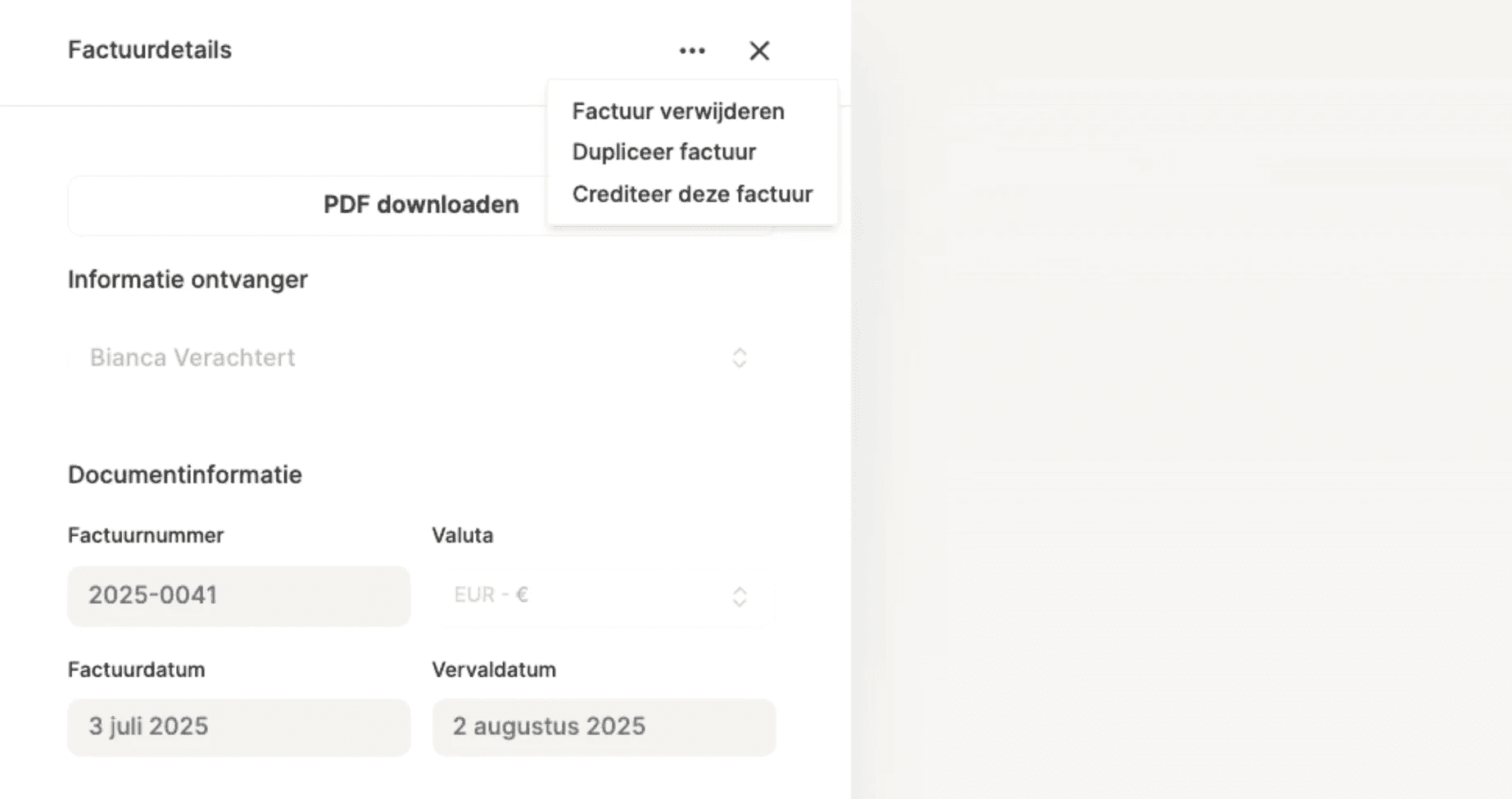
Or you start from a new invoice. Choose the beneficiary and change the status to "Credit note". Also select which invoice this credit note relates to. You will then fill in the details, such as the amount to be credited, yourself.
👋 Heeft dit je vraag niet kunnen beantwoorden? Stuur ons dan een email op info@cashfeed.com!
Lennert Decuypere



Automate your bookkeeping

ISO27001 certified

Dok-Noord 4D 101, 9000 Gent, Belgium
BE1020118217
2026 Cashfeed BV. All rights reserved.
Help
Create a credit note
Creating a credit note in Peppol? It looks very much like creating an invoice, but then a negative one.
There are two ways:
Either you start directly from the invoice to be credited. Click on the three dots in the top left and choose "Credit this invoice" to take over all the details. Adjust the amount if necessary, if you do not wish to credit the full invoice.
Or you start from a new invoice. Choose the beneficiary and change the status to "Credit note". Also select which invoice this credit note relates to. You will then fill in the details, such as the amount to be credited, yourself.
👋 Heeft dit je vraag niet kunnen beantwoorden? Stuur ons dan een email op info@cashfeed.com!
Lennert Decuypere
Automate your bookkeeping
ISO27001 certified
Dok-Noord 4D 101, 9000 Gent, Belgium
BE1020118217
2026 Cashfeed BV. All rights reserved.
Automate your bookkeeping
ISO27001 certified
Dok-Noord 4D 101, 9000 Gent, Belgium
BE1020118217
2026 Cashfeed BV. All rights reserved.
Help
Create a credit note
Creating a credit note in Peppol? It looks very much like creating an invoice, but then a negative one.
There are two ways:
Either you start directly from the invoice to be credited. Click on the three dots in the top left and choose "Credit this invoice" to take over all the details. Adjust the amount if necessary, if you do not wish to credit the full invoice.
Or you start from a new invoice. Choose the beneficiary and change the status to "Credit note". Also select which invoice this credit note relates to. You will then fill in the details, such as the amount to be credited, yourself.
👋 Heeft dit je vraag niet kunnen beantwoorden? Stuur ons dan een email op info@cashfeed.com!
Lennert Decuypere
Related to
Automate your bookkeeping
2026 Cashfeed BV. All rights reserved.
Automate your bookkeeping
2026 Cashfeed BV. All rights reserved.
